Set up the Sage 200 Standard integration
Explore our API integration with Sage 200 Standard.
About Sage 200 Standard
Sage 200 Standard is an accounting solution for small to medium-sized businesses. This cloud-based application provides a flexible tool for organizations to manage their stock, financials, sales, purchases, and sales orders.
Codat currently supports Sage 200 Standard Standard only.
Set up Sage 200 Standard
Sage has recently modified the way applications and integrations are authenticated in Sage 200 APIAPI A set of rules and protocols that allows different software applications to communicate with each other. Codat provides APIs for accessing financial data from accounting, banking, and commerce platforms.. You can find out more about the changes in Sage 200 API - Guide to Sage ID Changes.
If you're a Codat customer who already has an account with Sage, please refer to section Request new credentials below. Customers who need to set up their Sage accounts are requested to follow the process described below.
Before you can access data from customers using Sage 200 Standard for their accounting, you need to set up a Sage 200 Standard integration in the Codat Portal. You'll need to:
- Request an account from Sage and obtain APIAPI A set of rules and protocols that allows different software applications to communicate with each other. Codat provides APIs for accessing financial data from accounting, banking, and commerce platforms. credentials.
- Wait for Sage to send through your secure keys.
- Retrieve a subscription and signing key from the Sage APIAPI A set of rules and protocols that allows different software applications to communicate with each other. Codat provides APIs for accessing financial data from accounting, banking, and commerce platforms. site.
- Add your secure keys to the Codat Portal.
Request an account and obtain APIAPI A set of rules and protocols that allows different software applications to communicate with each other. Codat provides APIs for accessing financial data from accounting, banking, and commerce platforms. credentials
- Request an account from Sage by filling out the Sage Developer Services API - Request an Account form. Provide the required details and choose Sage 200 Standard APIAPI A set of rules and protocols that allows different software applications to communicate with each other. Codat provides APIs for accessing financial data from accounting, banking, and commerce platforms. as the application you are developing for.
- Once your account has been created you will receive an email from Sage with a linkLink The authorization flow that allows end users to connect their accounting, banking, or commerce platforms to your application via Codat. to a my.sage.co.uk page, where you can sign in to get your account number under My account > My accounts.
- Request your APIAPI A set of rules and protocols that allows different software applications to communicate with each other. Codat provides APIs for accessing financial data from accounting, banking, and commerce platforms. credentials by filling out the Sage 200 API Credential Request Form.
When your APIAPI A set of rules and protocols that allows different software applications to communicate with each other. Codat provides APIs for accessing financial data from accounting, banking, and commerce platforms. credentials have been generated, Sage will email your Client ID and Secret to you.
Note: When submitting the Sage 200 APIAPI A set of rules and protocols that allows different software applications to communicate with each other. Codat provides APIs for accessing financial data from accounting, banking, and commerce platforms. Credential Request Form:
- Request the maximum expiry time for the refresh token, namely 90 days.
- Request via the form for each environment for which you require credentials.
- For the question 'Desktop or Web Application' select 'Web'.
- For the question 'Redirect URL(s)' enter:
https://sage200cloud.codat.io/oauth/callbackfor Production.
Retrieve the APIAPI A set of rules and protocols that allows different software applications to communicate with each other. Codat provides APIs for accessing financial data from accounting, banking, and commerce platforms. subscription and signing keys
Subscribe to the Sage APIAPI A set of rules and protocols that allows different software applications to communicate with each other. Codat provides APIs for accessing financial data from accounting, banking, and commerce platforms. for Sage 200 Unlimited.
- Go to the Sage API page.
- In the top-right corner, select Sign in, and follow the instructions to register your details.
When your registration is complete, you're automatically taken to your account profile. - Return to the Sage API page.
- Under Products, choose Sage 200 Unlimited. The Sage 200 Unlimited page is displayed listing the APIsAPI A set of rules and protocols that allows different software applications to communicate with each other. Codat provides APIs for accessing financial data from accounting, banking, and commerce platforms. available for this product and it covers both Sage 200 Standard and Sage 200 Extra/Professional.
- Select Subscribe.
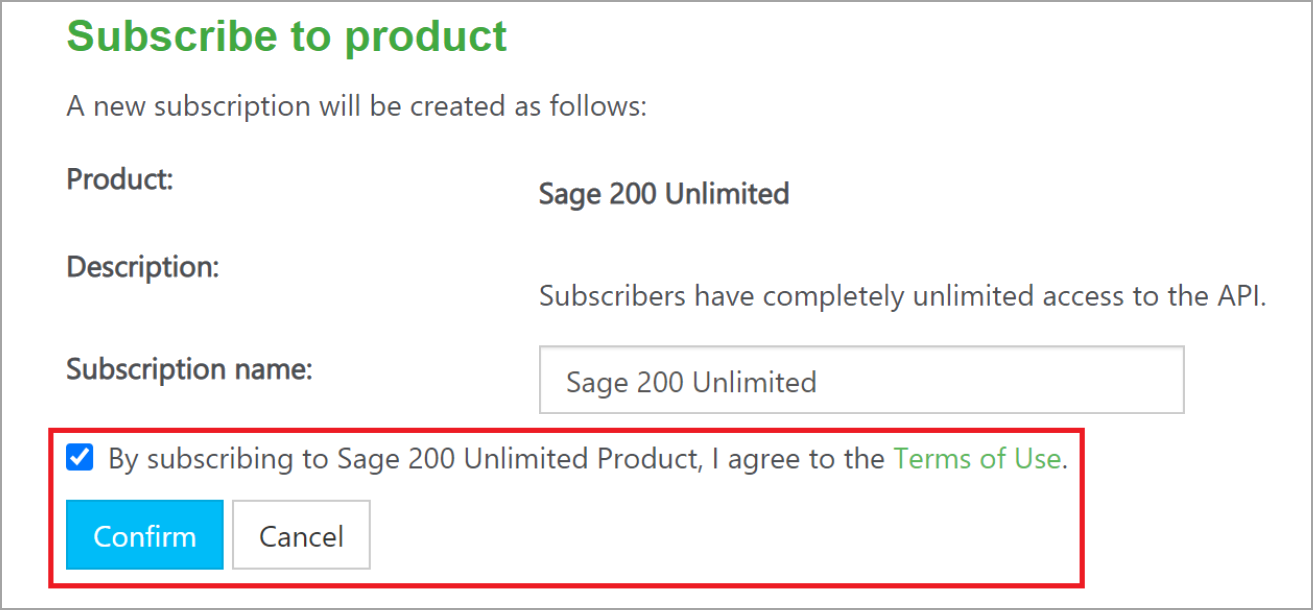
- Select the By subscribing to Sage 200 Unlimited... checkbox and select Confirm.
Retrieve your signing keys
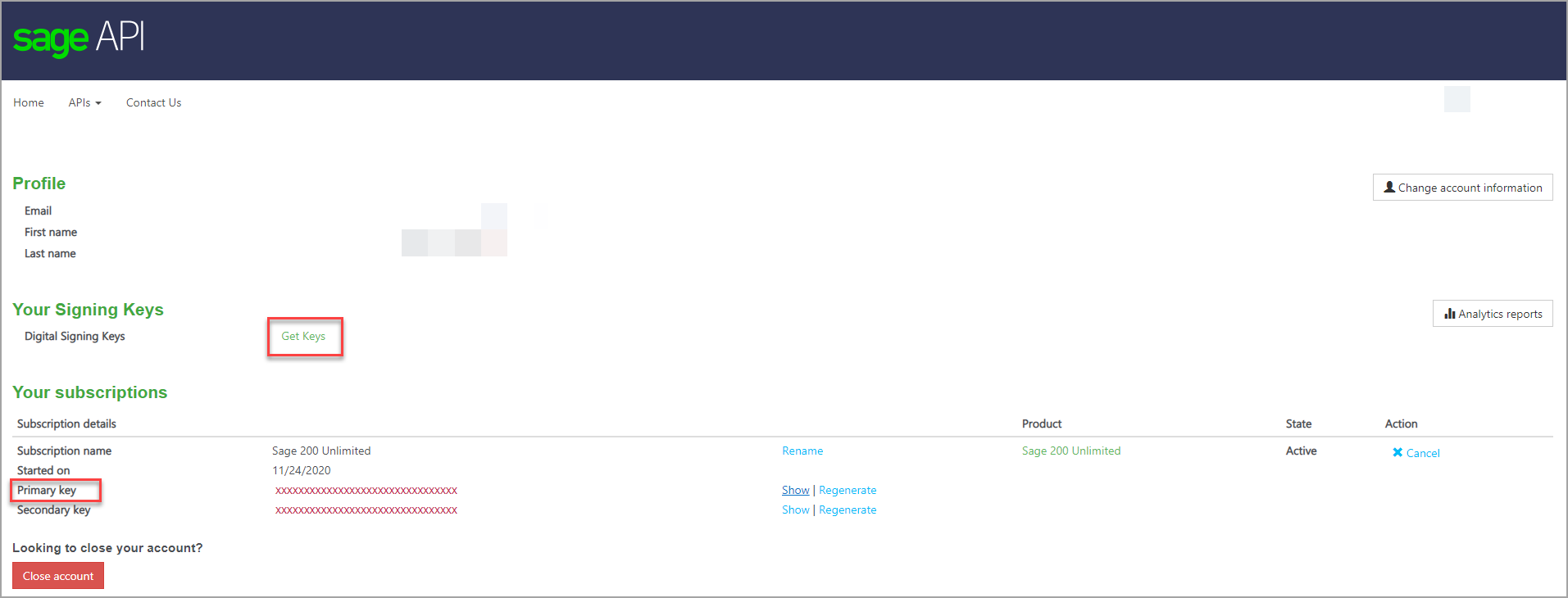
- From your profile, in the Your Signing Keys section, select Get Keys.
- Select Show and then copy the Primary key value to a Word document or similar. This is the signing key that you need to set up your integration in the Codat Portal.
- Close the dialog box to return to your profile details.
- In the Your subscriptions section, again select Show and copy the Primary key value. This is the subscription key that you also need to set up your Codat integration.
Add your secure keys to the Codat Portal
-
In the Codat Portal, go to the Accounting integrations page.
-
Locate Sage 200 Standard and click Set up.
-
Under Integration settings, enter the values for the Client ID and Client secret that you received from Sage.
-
Enter your Subscription key. This is the value of the Primary key from your Sage APIAPI A set of rules and protocols that allows different software applications to communicate with each other. Codat provides APIs for accessing financial data from accounting, banking, and commerce platforms. subscription.
-
Click Save. A confirmation message appears if the settings were saved successfully.
-
The Enable Sage 200 Standard dialog is displayed. Select whether to enable the integration now or later.
Make sure that your secure keys don't contain any spaces.
Enable the Sage 200 integration
- In the Codat Portal, go to the Accounting integrations page.
- Locate Sage 200 Standard and click the toggle to enable the integration.
You can also click Manage to view the integration's settings page, and then enable the integration from there.
Your Sage 200 Standard integration is now set up.
Test your integration
We recommend that you test your integration before sending LinkLink The authorization flow that allows end users to connect their accounting, banking, or commerce platforms to your application via Codat. URLs to customers. You'll need your own Sage 200 Standard account to do this.
Unfortunately, you can't use a trial account to test your integration. Sage doesn't allow the creation or update of records from their trial accounts.
- Set up some test data in your Sage 200 Standard account. For example, some new or amended invoices.
- Next, go to the Codat Portal where you've enabled your integration and create a test company.
- Find the LinkLink The authorization flow that allows end users to connect their accounting, banking, or commerce platforms to your application via Codat. URL for your test companyCompany In Codat, a company represents your customer's business entity. Companies can have multiple connections to different data sources.. Select Request data next to the companyCompany In Codat, a company represents your customer's business entity. Companies can have multiple connections to different data sources. name.
- Use the LinkLink The authorization flow that allows end users to connect their accounting, banking, or commerce platforms to your application via Codat. URL to connect your Sage 200 Standard account.
- When LinkLink The authorization flow that allows end users to connect their accounting, banking, or commerce platforms to your application via Codat. opens, select Sage 200 Standard, and then select Continue to Sage 200 Standard.
- Log in to your Sage 200 Standard account.
- Authorize access to your account details.
- Make sure that test data from your account is displayed for your test companyCompany In Codat, a company represents your customer's business entity. Companies can have multiple connections to different data sources. in the Codat Portal.
Request new credentials
If you already have a Sage Developer account, you won't need to register an account and can just request credentials. To request credentials:
- Sign in to your account on My Sage page and go to ‘My Accounts’ where you can find your account number.
- Fill out the Sage 200 API Credential Request Form to request new APIAPI A set of rules and protocols that allows different software applications to communicate with each other. Codat provides APIs for accessing financial data from accounting, banking, and commerce platforms. credentials.
- Retrieve subscription key by subscribing to the Sage 200 APIAPI A set of rules and protocols that allows different software applications to communicate with each other. Codat provides APIs for accessing financial data from accounting, banking, and commerce platforms. on the Sage 200 API page for developers.
- When your APIAPI A set of rules and protocols that allows different software applications to communicate with each other. Codat provides APIs for accessing financial data from accounting, banking, and commerce platforms. credentials have been generated, Sage will provide Client ID and secret via email.
Note: When submitting the Sage 200 APIAPI A set of rules and protocols that allows different software applications to communicate with each other. Codat provides APIs for accessing financial data from accounting, banking, and commerce platforms. Credential Request Form:
- Request the maximum expiry time for the refresh token, namely 90 days.
- Request via the form for each environment for which you require credentials.
- For the question 'Desktop or Web Application' select 'Web'.
- For the question 'Redirect URL(s)' enter:
https://sage200cloud.codat.io/oauth/callback
If you linkLink The authorization flow that allows end users to connect their accounting, banking, or commerce platforms to your application via Codat. a Codat test companyCompany In Codat, a company represents your customer's business entity. Companies can have multiple connections to different data sources. to one of the Sage sandbox accounts, the balance sheet dataset will fail to syncSync The process of fetching the latest data from a connected data source. Syncs can be triggered manually or run automatically on a schedule., and shows the status ValidationError. This is because the dataset fails Codat's checks, which make sure that a balance sheet balances, that is, net assets are equal to equity.
Due to a Sage 200 Standard limitation, tax rates on line items for invoices, credit notes, bills, and bill credit notes appear differently to other integrations. For more information, see Sage 200 Standard limitations.